Flexible workspaces
Configure multi-viewport grids, compare series side by side, and apply hanging protocols for faster study setup.
Enterprise zero-footprint viewer for any modern browser. Open studies instantly over DICOMweb with multi-viewport reading, MPR, 3D tools, measurements, synchronized reference lines, and in-viewer voice recording / dictation — no plugin or desktop install.
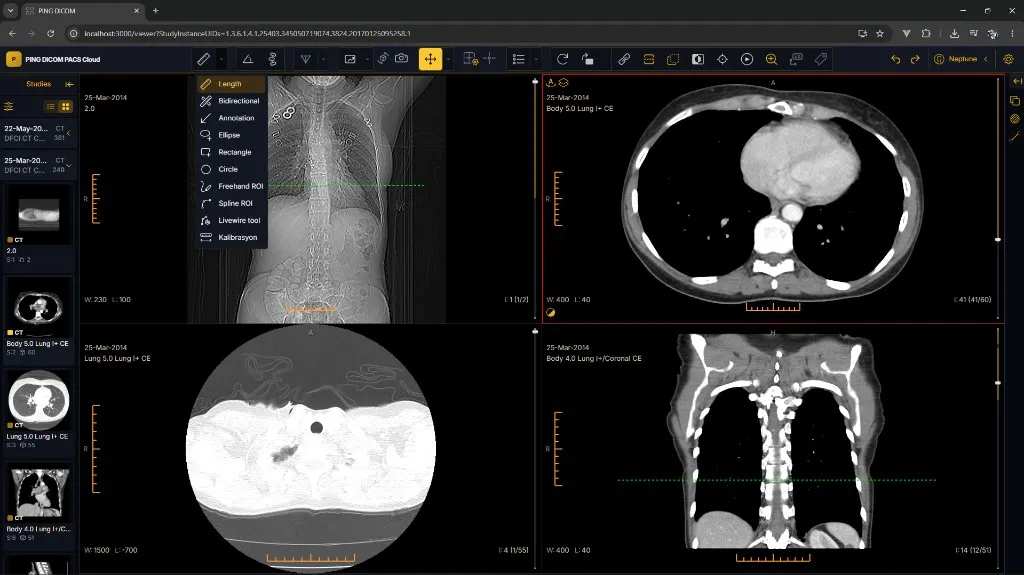
Zero-footprint viewing tools built for clinical reading across sites and devices.
Configure multi-viewport grids, compare series side by side, and apply hanging protocols for faster study setup.
Review reformats with crosshairs and reference lines so axial, coronal, and sagittal views stay clinically aligned.
Length, angle, ROI, cobb, bidirectional, and annotation tools for routine diagnostic and clinical review workflows.
Cine play for multi-frame series, window/level presets, zoom, pan, invert, rotate, and flip for everyday reading.
Volume rendering and reconstruction tools for CT/MR volumes when clinicians need more than stack scrolling.
Capture voice notes while reviewing a study; attach dictation context for reporting or teleradiology handoff — without leaving the browser.
Query and retrieve studies through modern DICOMweb APIs from PING DICOM archives and compatible imaging backends.
Designed for healthcare organizations that need reliable, scalable medical image management.
Let clinicians and referring physicians review studies from hospital PCs, laptops, or approved browsers without deploying desktop software.
Share a consistent browser reading experience across sites while archives stay in Cloud PACS, On-Prem PACS, or VNA.
Avoid workstation imaging installs, version sprawl, and desktop packaging — update once on the server, users get the latest viewer.
Viewer sessions, roles, and study access designed for clinical networks.
Authenticated sessions with idle timeout and encrypted DICOMweb traffic.
Limit who can open studies, export images, or use advanced tools.
Track study opens and key actions for compliance and IT review.
Tell us about your sites, volume, and requirements — we'll prepare a custom quote.
Built for standards-based access to PING DICOM and interoperable archives.
Give clinicians zero-footprint access to studies with enterprise multi-viewport tools — and keep Workstation for dedicated reading rooms.